
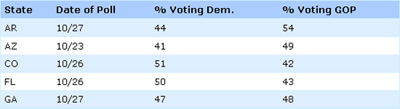
I recently spent a bit of time on the OneHundredPushups website, and the aspect of the site that most caught my eye (aside from ninja-girl on the front page) was the zebra-striped tables strewn throughout. (For those not in the know, zebra striping tables refers to alternating colored backgrounds on table rows, a la iTunes.) Studies have shown that there is (or at least can be) a slight performance increase associated with zebra striped tables (or at least there isn’t a decrease), and that most users prefer zebra striping to traditional lined tables.
I thought the tables on OneHundredPushups were fairly well done (take a look for yourself here), but a glance at the code showed me that the developer had put more work than was necessary into creating his stripes. Here, I’ll show you an easy way to create a table like the one in the image above (or on the example page here) that doesn’t require you to mess with your XHTML — in fact, you could easily apply this to tables already on your website!
Of course, before we can dive into the CSS, we’ll need a table to style. Mine looks something like this:
<table cellpadding="0" cellspacing="0">
	<tr>
		<th>State</th>
		<th>Date of Poll</th>
		<th>% Voting Dem.</th>
		<th>% Voting GOP</th>
	</tr>
	<tr>
		<td>AR</td>
		<td>10/27</td>
		<td>44</td>
		<td>54</td>
	</tr>
	<tr>
		<td>AZ</td>
		<td>10/23</td>
		<td>41</td>
		<td>49</td>
	</tr>
	... and so on ...
</table>
As you can see, it’s nothing out of the ordinary. I’ve used the old-school cellspacing and cellpadding attributes just to ensure consistent treatment across browsers. And otherwise, I’m using a <th> tag or four to distinguish my table headers from the rest of my code. Otherwise, we’ve just got rows and cells galore. You’ll notice there’s not a single class or ID present here (although if I only wanted to style some of the tables on my site, I’d probably give the styled ones a specific class name).
Next, let’s take a look at the basic CSS styles I’m using:
table {
	width: 100%;
	border: 1px solid #cef;
	text-align: left; }
th {
	font-weight: bold;
	background-color: #acf;
	border-bottom: 1px solid #cef; }
td,th {
	padding: 4px 5px; }
I’ve set the table width to 100% to stop it from collapsing to its minimum size (the default behavior), then given it a pale blue border around the outside. I’ve also set the text alignment throughout the table to “left” — this is to prevent my table headers from centering themselves, which is the default. I prefer my headers to be aligned with my content, but your mileage may vary.
When it comes to the headers, I’ve done a little styling: I’ve given them a background color (a bit darker than my border), bolded the text, and given the bottom of the headings a border what matches the border around my entire table.
Finally, I’m just adding a bit of padding to the interiors of the table cells, to give them a little breathing room. Personally, I think an appropriate use of white (or at least negative) space can be just as critical to legibility as zebra striping — perhaps someone out there more statistically inclined than me should look into that!
Those styles give us our basic table layout, which looks something like this:

So how do we get the alternating rows? For that, I’m creating a new class in my CSS, specifically for the odd (that is, not-even) rows of the table:
.odd {
	background-color: #def; }
.odd td {
	border-bottom: 1px solid #cef; }
This class, once applied to alternating rows of my table, would cause every other row to gain a pale blue background color and a slightly darker bottom border. Since this A List Apart study by Jessica Enders suggested that alternating colored rows and underlines were two of the most aesthetically appealing ways to present tabular data, I figured… why not use both?
Now if I wanted, all I would need to do is go back through my HTML and apply this class to alternating rows in my tables, like the folks at OneHundredPushups have done. However, you’ll notice that my code above doesn’t have any CSS classes. That’s because I prefer to work smarter whenever I have the chance. Instead of turning back to my HTML, I’m going to look to JavaScript (specifically, jQuery) to do my heavy lifting for me.
To apply our class automatically, all the jQuery I need is this:
$(document).ready(function(){
	$("tr:odd").addClass("odd");
});
In layman’s terms, this tiny snippet is saying, “once the document is done loading, cycle through the page, find every ‘odd’ table row, and give it a class of ‘odd.’” Then our CSS takes over and does the rest. Oh, and for the record, you could also write a second rule like this:
$("tr:even").addClass("even");
Which would do the exact same thing as above, only apply it to the “even” rows of the table. And just so you’re not caught off guard by this script’s behavior, it’s good to know in advance that the :odd and :even pseudo-classes start counting at zero, not one. So the first row of your table is, according to jQuery, the “0th” row, and is therefore even.
And there you have it! You can see the whole thing in action here. And now, go forth and make the web a more beautiful (or at least stripy-er) place.