CSSnewbie

About CSSnewbie

Our mission is to help the beginning to intermediate web designer master the subtleties of CSS by offering CSS tutorials, tips, and techniques.

Recent Article

Using Definition Lists: Question & Answer formatting

Posted on April 21, 2008. By Guest Author.

This guest article was written by Chris Coyier of CSS-Tricks, a site featuring tips, tricks, and tutorials on web design.

Unordered lists seem to get all the love these days, but there are just some things that are better semantically described with definition lists. Never heard of them? I’m not surprised. Here is the basic syntax:

<dl>
    <dt>Definition Term</dt>
    <dd>Definition Description</dt>
</dl>

There are two big differences between unordered lists and definition lists. One, there are two different elements that belong in a definition list: dt’s & dd’s. In unordered lists, all you have is li’s. Two, the only default styling applied to definition lists is a bit of a left-margin to the dd elements — no bullets or other strange positioning to fight.

Having two different tags to work with is what makes definition lists valuable. Take for example the need to create a FAQ’s page with a bunch of questions and their answers. Each question and answer group would really benefit from having a parent element, because then you could, for example, control the spacing between them or perhaps apply a border to visually separate them.

Many people would go straight for the div. With something like:

<div class="qa">
    <h4>Question</h4>
    <p>Answer</p>
</dl>	

The problem with this is that div’s are very commonly used. Chances are, your page is already using several so it’s likely you will need to apply an unique class to the div to style it individually.

Other people will go straight for the unordered list:

<ul>
    <li class="question">Question</li>
    <li class="answer">Answer</li>
</ul>

The problem with this is that since you only get li elements in your ul, you will need to apply unique classes to them in order to get different styling.

I propose that the best elements to use for something like question/answer content is the definition list:

<dl>
    <dt>Question</dt>
    <dd>Answer</dt>
</dl>

Will using a div or an ul work? Sure, they’ll work just fine and nobody is going to slap your hand for using them. But if you want to be a super hip semantics junkie, you’ll use a definition list. You get all the advantages: a parent element for styling the whole group and different tags for the question and answer so they can be styled separately without needing to use unique classes. If needed, you can also use multiple dt’s and dd’s and use them in any order you wish.

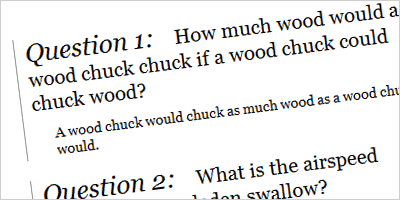
Check out this example of a question and answer list using definition lists (click the image to see a live example):

Responses

On 4/21/2008 at 4:11pm, Richard said,

That’s a really cool trick and perfect for FAQ’s. I will be implementing an FAQ on a site shortly so I will definitely give this a try. As ever it makes perfect sense.

On 4/22/2008 at 12:10am, mooty said,

This is a cool trick, I’ve never really used dt’s before, don’t know why, never really known what they did, and always struggled with ul’s to get things to work.

i’ve been a web designer for 3 1/2 yrs and this is news to me. cheers

On 4/22/2008 at 7:50am, mardulia said,

Good idea. Two things. I think you’d better look at your mark-up carefully. There are a couple of end tags that aren’t closed properly. Bu maybe you’ve seent that already.;-)

Technically I suppose you could enclose the entire QA of your example in a single couldn’t you, and give that an id. Yes?

On 4/22/2008 at 7:51am, mardulia said,

Sorry that last should read-

“Technically I suppose you could enclose the entire QA of your example in a single dl couldn’t you, and give that an id. Yes?”

On 4/22/2008 at 8:27am, Links of Interest - CSS-Tricks said,

[…] wrote a guest article over at CSS Newbie on using definition lists for question and answer formatting. It’s pretty simple stuff, but it is good to know because sometimes those DL’s are just […]

On 4/22/2008 at 10:02am, » Using Definition Lists: Question & Answer formatting Webcreatives said,

[…] Using Definition Lists: Question & Answer formatting Related StuffMost used CSS tricksSoftware Development in the Real World: The Complete List of CSS ToolsVirtual Hosting Blog » The Cheat Sheet Cheat Sheet: Top 100 Lists of Web Development Cheat SheetsUsing CSS to Do Anything: 50+ Creative Examples and TutorialsAnimated horizontal tabsCSS Confirmation Message BoxesEffective CSS ShorthandCSS VariablesImproved Current Field Highlighting in Forms101 Awesome Downloadable Fonts for Designers […]

On 4/23/2008 at 4:29pm, Edwin said,

Great article, I never used defenition lists before. Heard of it, but never saw the advantage of it. This is a very good example to show how to use them good :)

On 4/27/2008 at 12:11am, Morpheus said,

Good technique but then, unlike in “ol”, where numbers are dynamic/automatic, this technique now forces you to Manually enter the question Numbers to the list.

If you re-order the qstns or delete a qstn, then you need to manually re-number the rest of the entries which can be a lot of work. Unless write a script that does the numbering for u (which again is work).

On 4/28/2008 at 2:24am, Definir listas para crear una secuencia de preguntas y respuestas « Xyberneticos said,

[…] Demo - Descarga ejemplos - Info cssnewbie - Via css-tricks Como dar estilo PLAIN TEXT […]

On 4/30/2008 at 11:51am, Best Of April 2008 | Best of the Month | Smashing Magazine said,

[…] Using Definition Lists: Question & Answer formatting - CSSnewbieA brief tutorial on how to use definition lists (dl) to format question & answer blocks. […]

On 4/30/2008 at 12:29pm, Paul Irish said,

It’s a horrible idea to wrap each pair/set in a DL.. The DL should be around all DT/DD sets, not each in particular.
Bad bad!

On 4/30/2008 at 3:23pm, JuG said,

As Paul Irish said !!!

On 5/1/2008 at 9:26am, NortelNetworks said,

Technically, if you wanted numbers, you could put each QA within it’s on DL (not a good idea), then, put each DL in it’s on LI within an OL.

On 5/1/2008 at 11:25pm, Kantongin » Best Of April 2008 said,

[…] Using Definition Lists: Question & Answer formatting - CSSnewbieA brief tutorial on how to use definition lists (dl) to format question & answer blocks. […]

On 5/3/2008 at 5:58am, Skaitiniai #55 » Pixel.lt said,

[…] Skaitiniai is back! Per girias, jūras ir ilguosius savaitgalius atžygiavo 55-ieji skaitiniai. Be didesnių ceremonijų pateikiu juos: Opera Developer Community: Stop using Ajax! Vileworks: Using captcha without displaying it IBM developerWorks: Build a customizable RSS feed aggregator in PHP Making The Web: Choosing Optimal MySQL Data Types A List Apart: Getting Started with Ruby on Rails A List Apart: Creating More Using Less Effort with Ruby on Rails CSSnewbie: Using Definition Lists: Question & Answer formatting […]

On 5/6/2008 at 2:46pm, Travis said,

I agree with Paul. One DL for the whole lot of them.

On 5/9/2008 at 4:06pm, Best Of April 2008 - Glimpses of the Aleph said,

[…] Using Definition Lists: Question & Answer formatting - CSSnewbieA brief tutorial on how to use definition lists (dl) to format question & answer blocks. […]

Leave a Reply

Do More